Resellers, trade-in operators, and refurbishers are handling more devices than ever. Finding inventory has gotten easier. Processing it accurately at volume has not.
Most businesses start with manual inspections. That works at low volume. As intake grows from dozens of devices per week to hundreds or thousands, manual workflows crack — different standards, longer times, more mistakes.
This guide covers what to check when buying a used iPhone, where manual processes break down, and how to build an intake operation that holds up as volume grows.
Key Takeaways
- A standardized intake process is the foundation of consistent, profitable used iPhone operations.
- Every device should pass through identity verification, cosmetic inspection, hardware testing, and security checks.
- Manual inspections become a bottleneck — and a liability — as volumes scale.
- Automated diagnostics reduce human error and increase throughput.
- Accurate intake data directly supports grading, pricing, and downstream resale decisions.
How Do You Build a Scalable Used iPhone Intake Process?
A scalable used iPhone intake process combines standardized inspection procedures, automated diagnostics, consistent grading criteria, and centralized reporting. Businesses with a solid intake workflow identify problems earlier, avoid purchasing mistakes, and handle larger volumes without proportional increases in labor costs. Without one, the consequences show up downstream: returns, warranty claims, mispriced inventory, and shrinking margins.
Why Intake Quality Affects Everything Downstream
Every decision made or skipped during intake carries a cost.
An iPhone incorrectly classified as fully functional may generate warranty claims or unexpected refurbishment costs. A device undervalued due to an incomplete inspection erodes margin. Both are avoidable with a consistent process.
The refurbished phone market was valued at over $40 billion globally and continues to grow. The objective is simple: determine the true condition and value of every device as quickly and accurately as possible.
What to Check When Buying a Used iPhone
The same inspection stages apply whether you're processing a single trade-in or a shipment of several hundred units.
1. Verify Device Identity
- IMEI and serial number — cross-reference against physical markings and documentation
- Model and storage capacity — verify directly, not from seller descriptions
- Carrier lock status — a locked device has a narrower resale market
- Activation Lock (iCloud) status — a device locked to a previous Apple ID cannot be resold
- Blacklist / lost or stolen status — a blacklisted IMEI cannot be activated
Industry data suggests up to 23% of bulk orders from unvetted suppliers contain devices with undisclosed issues. IMEI verification catches many of these before purchase.
2. Inspect Physical Condition
- Screen condition (cracks, scratches, dead pixels, burn-in)
- Body scratches, dents, and frame damage
- Back glass integrity
- Camera lens condition
- Evidence of liquid exposure (LCI indicators)
- Signs of unauthorized or non-OEM repairs
Without documented grading standards, two technicians will assign different grades to the same device. That inconsistency compounds across hundreds of units.
3. Test Hardware Functionality
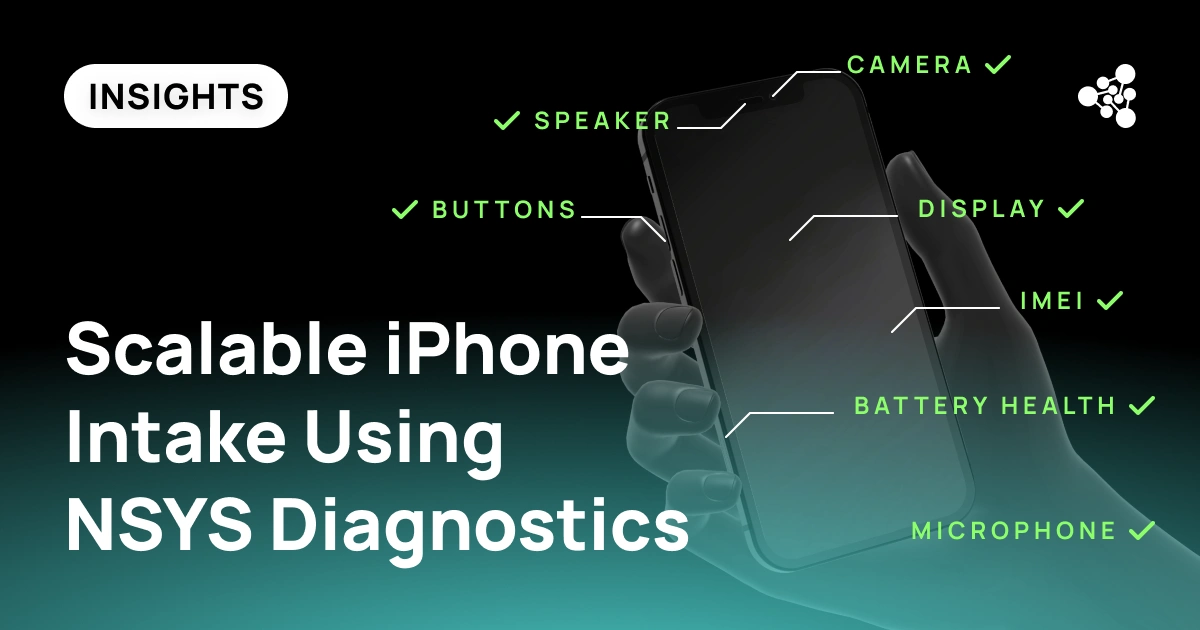
- Battery health (capacity percentage, cycle count where available)
- Display (brightness, touch response, color accuracy)
- Cameras (front and rear, video, autofocus)
- Microphones and speakers
- Charging port and wireless charging
- Face ID / Touch ID
- Wi-Fi and Bluetooth
- Cellular connectivity
- Buttons and sensors (volume, side button, proximity sensor, accelerometer)
Manual testing takes 10 to 15 minutes per device. At high volume, fatigue increases the likelihood that something gets missed.
4. Check Software and Security Status
- iOS version and update availability
- Activation Lock status (confirmed off, not assumed)
- MDM (Mobile Device Management) enrollment — common in corporate-sourced devices
- System-level restrictions that may survive a factory reset
- Whether a full data wipe has been completed
MDM locks are frequently overlooked. A device enrolled in a corporate MDM profile may be unusable for the next owner even if it passes every hardware test.
The Buying a Used iPhone Checklist: A Repeatable Workflow
|
Step |
Purpose |
|
Identity verification |
Confirm device legitimacy and specifications |
|
Cosmetic inspection |
Assess visual condition against grading criteria |
|
Functional testing |
Verify all hardware components |
|
Security checks |
Detect locks, MDM enrollment, and restrictions |
|
Grading |
Assign a condition category based on findings |
|
Documentation |
Record inspection results for traceability |
|
Pricing |
Set resale value based on verified condition |
Where Manual Processes Break Down at Scale
As volume grows, the same four problems appear consistently: technicians apply slightly different standards, producing grading discrepancies across teams; a 10–15 minute inspection per device becomes a throughput constraint at 300+ units per day; fatigue leads to missed defects and incomplete records; and without centralized reporting, managers have no visibility into defect rates or supplier quality until problems are already in inventory.
How Automation Improves Intake Operations
Automated diagnostics run standardized checks across every device in the same way, every time, with results recorded automatically. This is what makes consistent quality achievable at volume — without scaling headcount at the same rate as device volume.
The operational impact is concrete:
- Faster processing — automated tests complete in a fraction of manual inspection time, increasing daily throughput without adding staff
- Consistent results — the same criteria applied to every device, regardless of who's running the test or how late in the shift it is
- Defect detection — intermittent sensor failures, non-original components, and early battery degradation surface in structured testing rather than after resale
- Standardized grading — test results feed directly into grading decisions, removing subjectivity and reducing disputes with suppliers or customers
- Centralized records — every device gets a documented inspection history, which supports traceability, warranty claims, and supplier performance tracking over time
For businesses running trade-in programs, processing wholesale lots, or operating multiple intake locations, this infrastructure is what separates a process that scales from one that requires constant manual oversight.
Using NSYS Diagnostics for Scalable iPhone Intake
NSYS Diagnostics covers more than 60 automated and semi-automated tests for iOS and Android devices, purpose-built for businesses processing used smartphones at volume.
During intake, teams use NSYS Diagnostics to run full hardware verification, check battery health against documented metrics, surface hidden defects that visual inspection misses, and generate standardized reports for every device processed. Grading decisions are supported by objective test data rather than technician judgment alone.
Results are recorded centrally, giving operations managers a real-time view of intake quality, supplier defect rates, and throughput — across individual workstations or multiple locations. That visibility makes it possible to catch problems at the source: a supplier consistently sending devices with degraded batteries, a technician skipping steps under time pressure, a lot with a higher-than-expected failure rate.
For refurbishers, wholesalers, trade-in operators, and retailers handling mixed-condition inventory, that level of control directly affects margin.
FAQ
What is the most important thing to check when buying a used iPhone?
Activation Lock status, IMEI legitimacy, and battery health. A device locked to a previous Apple ID cannot be resold. A blacklisted IMEI cannot be activated. Battery condition directly affects grade and resale value.
What should a buying a used iPhone checklist include?
Identity verification (IMEI, model, carrier lock, Activation Lock), cosmetic inspection, hardware functionality testing, software and security status, grading, and documentation.
How long does a manual iPhone inspection typically take?
Between 10 and 15 minutes per device, longer when issues need further investigation. That compounds quickly at scale.
What to look for when buying a used iPhone in bulk lots?
Lot-level consistency: grading standards, documentation (IMEI logs, test reports), Activation Lock clearance, and proof of data wipe. Mixed-condition lots without documentation are a common source of post-purchase problems.
Why is automated diagnostics important for used device intake?
Automation applies the same tests to every device, reducing human error, increasing throughput, and generating standardized records for grading, pricing, and traceability.
Can NSYS Diagnostics support used iPhone intake operations?
Yes. NSYS Diagnostics automates functional testing across more than 60 checks for iOS devices, generates standardized reports for grading and pricing workflows, and provides centralized visibility into intake performance across teams and locations.
How can businesses scale used iPhone purchasing operations?
Standardize workflows, automate testing, document grading criteria, and maintain centralized reporting.